Firewalls are still an essential part of any network security strategy, with the global firewall market projected to grow from $15.27 billion in 2024 to $33.19 billion in 2032.1 However, choosing a firewall isn’t as simple as it used to be. One of the most common questions IT teams face is whether to use a hardware firewall, a software firewall, or perhaps a combination of both.
Understanding what each of these firewall types does can help you make the right call for your business’s size, structure, and security needs. In this blog, we’ll walk through how hardware and software firewalls differ, where they work best, and how to choose the right fit for your environment.
Key Takeaways
- Hardware firewalls guard the whole network at the perimeter, while software firewalls run on individual devices for per-app, per-endpoint control.
- The better fit depends on your environment, from network size to remote and BYOD users to cloud workloads, which is why many organizations layer both together.
- Performance separates them on throughput, concurrent sessions, and encrypted-traffic inspection, with appliances using dedicated hardware and software scaling out across instances.
- The cost models differ too: a hardware firewall is an upfront capital purchase with refresh cycles, while a software firewall is an ongoing subscription that scales with usage.
Is a Firewall Hardware or Software?
The short answer is that they can be both. Firewalls aren’t tied to one format. Instead, the term refers to the function – controlling and inspecting traffic – not the physical form. Let’s explore the different types below.
What Is a Hardware Firewall?
A hardware firewall is a device that filters traffic before it enters your network. It usually sits between your internal network and the internet and acts as the first line of defense, inspecting incoming and outgoing data at the perimeter.
Unlike software firewalls, which are installed directly on computers or servers, hardware firewalls operate independently and don’t rely on system resources. They’re typically installed in a telecom closet or server rack and are designed to secure large volumes of traffic.
Benefits of a Hardware Firewall
Hardware firewalls provide several advantages that make them a good fit for businesses with a more centralized infrastructure. These include:
- Network-Wide Protection: A single appliance can monitor and filter traffic for all connected users and devices.
- Dedicated Performance: Hardware firewalls don’t impact endpoint performance since they run on their own resources.
- Stronger Throughput: These devices are designed to process large amounts of data with minimal delay, making them ideal for offices and data centers.
- Advanced Configurations: Many hardware firewalls support VPNs, intrusion prevention, deep packet inspection, and custom traffic policies.
If you manage a larger network or want to minimize the load on individual devices, a hardware firewall can help streamline protection across your entire organization.
What Is a Software Firewall?
A software firewall is an application installed on a device, like a laptop or virtual machine. It monitors traffic on that specific endpoint, including from local apps, web browsers, and even other devices on the same network, and blocks unauthorized or suspicious behavior.
Software firewalls give you more control over individual machines and are especially useful in environments with remote users, personal devices, or systems that operate outside your network perimeter.
Benefits of a Software Firewall
Software firewalls also offer their own set of advantages, particularly for businesses that need more flexibility in their security management. Some benefits include:
- Per-Device Control: You can set custom rules for what each device is allowed to send or receive, right down to the application level.
- Remote Work Support: Users who connect from outside your office still benefit from a layer of protection.
- Lower Cost: Many operating systems include built-in software firewalls, and others are available through third-party vendors.
- Security Integration: Software firewalls often work alongside antivirus, endpoint detection and response (EDR), and other security platforms for stronger visibility.
These advantages make software firewalls helpful for securing remote devices and cloud workloads without sacrificing visibility or control at the endpoint level.
Examples of Software Firewalls
Here are a few software firewall tools you might find in business IT environments:
- Windows Defender Firewall: Built into Windows OS, it offers basic packet filtering and rule-based controls.
- pfSense: A flexible, open-source firewall platform often used for custom network setups.
- ZoneAlarm: A personal firewall solution with strong app-based control.
- Bitdefender Internet Security: Includes firewall functionality alongside antivirus and web protection.
- iptables/nftables (Linux): Built-in tools for creating and managing firewall rules on Linux systems.
IT teams can configure these software firewalls to block specific apps, restrict traffic by port or IP, and flag unusual activity at the device level.
Hardware Firewall vs Software Firewall: Key Differences
The biggest differences when comparing hardware vs software firewalls are where and how traffic is filtered. Here’s a quick breakdown:
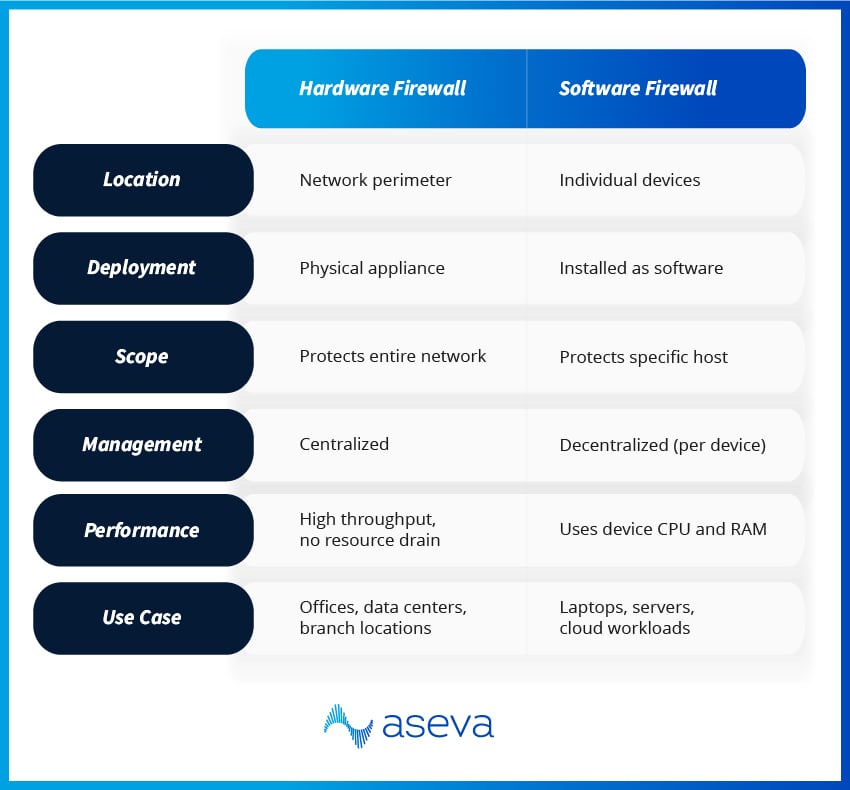
If you need broad coverage across many users or sites, a hardware firewall is likely the better choice. If you need flexible, application-level control for specific endpoints, software firewalls have the edge.
Hardware vs Software Firewall Performance Compared
Performance is one of the clearest places hardware and software firewalls diverge, and it usually comes down to how each one handles load. Three dimensions matter most when you're sizing a firewall for your network.
Throughput
Throughput is the volume of traffic a firewall can process at once. Hardware appliances often include dedicated acceleration chips, so they sustain high packet rates without strain. A software firewall draws on the CPU of its host or cloud instance, which means its ceiling is tied to whatever resources that machine has to spare.
Session Capacity
Session capacity is the number of simultaneous connections a firewall can track. Dedicated appliances carry memory and processors built for exactly this, so they hold up under thousands of concurrent sessions. Software firewalls handle fewer sessions per instance, but they scale out by adding more instances as demand grows.
SSL/TLS Inspection
Inspecting encrypted traffic is the most resource-hungry task a firewall takes on. Hardware models can offload this work to cryptographic modules and keep speeds steady. Software firewalls lean on general-purpose CPU cycles, so heavy decryption can slow them down if the host isn't sized for it.
None of this makes one form factor better than the other. The way to decide is to measure your own traffic: peak and average data rates, how many sessions you run at once, and how much of that traffic is encrypted. Those numbers tell you whether a single appliance will keep up or whether scalable software enforcement fits your environment better.
Hardware vs Software Firewalls: Cost & Licensing
Cost is rarely just the sticker price of the firewall. The two form factors follow different spending models, and the gap shows up over the full life of the deployment.
Hardware Firewalls: An Upfront Investment
A hardware firewall is usually a capital expense. You buy the appliance, then budget for support contracts and an eventual hardware refresh every few years. Licensing for advanced features is often bundled by throughput tier, so a higher-capacity model carries a higher ongoing commitment alongside the device itself. Costs are predictable, which makes them easy to plan around when your traffic patterns are stable.
Software Firewalls: An Ongoing Subscription
A software firewall shifts spending into operating expenses. You pay for the cloud instance or virtual machine it runs on, plus the software license, and you scale by spinning up more instances as you need them. That flexibility cuts both ways: costs stay lean for variable workloads but can climb quickly if usage spikes or you run many instances across regions.
Watch the secondary costs on both sides. Hardware adds shipping, installation, rack space, and lifecycle management. Software can surprise teams with cloud egress fees and per-instance licensing that's hard to forecast. Keep in mind that the market is steadily moving toward subscription pricing for hardware and software alike, so the two models are converging even where the form factors differ.
When To Use a Hardware vs Software Firewall
Choosing between a hardware vs software firewall isn’t about which is “better” – it’s about which fits your operational and security needs.
Use a hardware firewall when:
- You want centralized control over a large office, data center, or campus network
- Your infrastructure supports many users or devices, and you need consistent traffic filtering
- You want to offload processing tasks from individual devices
- You need advanced capabilities like site-to-site VPNs or high-throughput inspection
Use a software firewall when:
- Your team includes remote workers or mobile users who connect outside your office network
- You need traffic rules for individual applications or services
- You’re protecting virtual machines or cloud-hosted workloads
- You operate in a bring-your-own-device (BYOD) environment where individual systems need their own controls
In many environments, especially hybrid or distributed ones, the best solution is to use both. For example, your office may have a hardware firewall managing network traffic, while individual laptops used by remote employees have software firewalls for protection outside the perimeter.
Build a Stronger Firewall Strategy With Aseva
With employees working from anywhere, cloud apps replacing on-premise systems, and cyber threats continuing to evolve, networks are more dynamic than they used to be. A single firewall, whether hardware or software, often isn’t enough.
Today, a layered strategy is more effective. Here’s how organizations are strengthening their firewall approach:
- Next-Generation Firewalls (NGFWs): These combine the performance of hardware firewalls with advanced features like threat detection, identity-based policies, and application filtering.
- Cloud-Native and Software-Defined Firewalls: Built for virtualized or multi-cloud environments, these firewalls scale as your infrastructure grows.
- Managed Firewall Services: For teams without in-house security experts, outsourcing firewall management ensures policies are maintained, threats are monitored, and changes are made as needed.
At Aseva, we help businesses design, deploy, and manage firewall solutions that align with their environment – whether it’s a fully remote team, a multi-location enterprise, or a hybrid cloud infrastructure. Our team works with you to implement the right combination of hardware and software firewalls, powered by leading tools like Fortinet.
Ready to take a smarter approach to firewall security? Get started today.
Hardware vs Software Firewall FAQs
Can a firewall be hardware and software, or do you have to pick one?
You don’t have to pick just one format. “Firewall” describes the role (inspecting and controlling traffic), not the packaging. Some firewalls are physical appliances, others are software installed on endpoints or virtual workloads, and many modern environments use both as part of a layered approach.
Which is better: a hardware firewall or a software firewall?
Neither is universally “best.” A hardware firewall is usually the better fit when you need centralized, network-wide protection and consistent performance for many users or devices. A software firewall is often the better choice when you need granular, application-level control on specific endpoints, especially for remote users, BYOD, or cloud-hosted systems. The right answer depends on where your users and workloads live, and how you manage security day to day.
What should you evaluate when choosing between hardware and software firewalls?
Start with your environment and your operational reality:
- Network shape: single office vs multiple sites vs hybrid cloud
- Workforce patterns: mostly on-site vs remote-first vs mixed
- Control needs: centralized policy enforcement vs per-device/app rules
- Performance requirements: high throughput at the perimeter vs endpoint-level filtering
- Management capacity: who will maintain rules, monitor alerts, and keep policies current
If your traffic and users are distributed, you’ll usually lean toward a combination rather than a single control point.
Do you really need a hardware firewall?
Not always. If you’re fully cloud-based with a remote workforce and strong endpoint controls, you may rely more on software-defined and cloud-native firewalling. But for many organizations, a hardware firewall still plays a critical role at the perimeter, especially when you have an office network, on-prem systems, shared infrastructure, or strict requirements around segmentation and access control.
Where should a hardware firewall be placed in the network?
In most setups, it sits at the network edge, between your internal network and the internet, so it can inspect inbound and outbound traffic before it reaches internal systems. In larger environments, you may also place firewalls between internal segments (for example, separating user networks from servers or sensitive systems) to limit lateral movement and tighten access.
Can you run a hardware firewall and a software firewall at the same time?
Yes, and it’s common. A typical model is a hardware firewall protecting the office or data center perimeter, paired with software firewalls on laptops, servers, and virtual machines for device-level control and protection when systems operate outside the perimeter. The key is aligning policies so you don’t create gaps, conflicting rules, or unnecessary friction for users.
What’s a drawback of hardware firewalls compared to software firewalls?
Hardware firewalls excel at broad, centralized control, but they’re less precise at the endpoint level. They can’t see or control device-specific behavior as directly as a software firewall can (like app-level rules on a single laptop). They also typically require upfront investment and physical deployment, which can be less flexible than rolling out software controls across distributed endpoints.
What are the common downsides of software firewalls?
Software firewalls bring flexibility, but they can introduce operational overhead. You may need to manage policies across many devices, ensure consistent configuration, and avoid “rule drift” over time. They can also consume endpoint resources, and if devices are unmanaged, out of date, or misconfigured, protection becomes inconsistent. That’s why many teams pair software firewalls with centralized management and monitoring, especially in larger or fast-growing environments.
What are some examples of hardware firewalls?
Common hardware firewall appliances include Fortinet's FortiGate, Cisco Secure Firewall (ASA and Firepower), the Palo Alto Networks PA-Series, Juniper's SRX Series, and SonicWall's TZ and NSa lines. Most are sold as families that scale from small-office units up to high-capacity data center models, and the majority are next-generation firewalls that bundle intrusion prevention and deep packet inspection. When you choose one, match its rated throughput and features to the size of the network it will protect.
How much does a hardware firewall typically cost?
It depends on capacity and features, but a hardware firewall is a capital purchase rather than a flat fee. You pay for the appliance upfront, then for support contracts and a hardware refresh every few years, with advanced-feature licensing often bundled by throughput tier. Small-business appliances sit at the low end, while enterprise and data center models cost considerably more. Factor in installation, rack space, and lifecycle management when you weigh the total cost against a subscription-based software firewall.
Sources: